RoomBooking: Rental Calendar
- 0.0
- Rating
- 10.00K
- Installs
- Free
- Price

 Analysis by App-foxy
When I first looked at RoomBooking: Rental Calendar, I understood its appeal quickly: it is built around one practical job, keeping bookings for rooms and rental properties visible in a calendar. That sounds simple, but for a small hotel, guest house, or independent host, a clear calendar can prevent the kind of confusion that starts with “I thought that room was free” and ends with an unhappy guest.
This is a free business app from ROOMBOOKING LLP, aimed at people who need to organize accommodation availability rather than browse for a holiday themselves. It is available to Everyone, supports devices running Android 7.0 or later, and has reached over 10K installs. The app was released on May 11, 2019, and its current version is 1.70.0. Those details place it in the useful middle ground between a paper planner and a larger hotel-management platform.
My overall impression is that its value depends less on how many extras you expect and more on whether you need a focused rental calendar. If your main problem is seeing which rooms or properties are occupied, reserved, or available, this approach can be refreshingly direct. If you need a complete booking marketplace, advanced accounting, or a large team workflow, you should be more cautious about making it your only business tool.
You May Also Like

 AccuWeather: Weather Radar
AccuWeather Review: A Quick, Clear Forecast for Everyday Decisions
For everyday plans, the best forecast is the one you can understand quickly. AccuWeather makes rain timing, radar, and local conditions easy to act on, with a few trade-offs.

 Hill Climb Racing
Why Hill Climb Racing Still Turns Crashes Into One More Run
A tiny car, a bumpy hill and one more upgrade: Hill Climb Racing keeps resurfacing because its simple chaos makes every near-miss feel personal.

 AliExpress - Shopping App
AliExpress Makes Global Shopping Feel Personal, but Shoppers Bear the Risk
AliExpress turns a global marketplace into a pocket-sized discovery engine. Its reach is useful, its shopping loop compelling, and its trade-offs easy to miss.

 Lords Mobile: Kingdom Wars
Lords Mobile Is a Kingdom-Building Routine, Not a Quick Match
A case-by-case verdict on the building, battles, device demands, and social commitments that make Lords Mobile rewarding for some players and exhausting for others.

 PDF Scanner app - TapScanner
TapScanner Makes Paperwork Easier to Capture, Check, and Share
TapScanner makes scanning with a phone feel less like a rescue operation and more like a dependable step in getting work done. Its capture tools are useful, though not flawless.

 Block Blast!
Block Blast! Shows How Much a Puzzle Game Can Leave Out
A quiet grid game shows why puzzle players increasingly value instant clarity, repeatable skill and low-pressure play—and where the genre still needs to catch up.
More From Our News Desk
View All News


A calendar-first way to control rental availability
I find a calendar most valuable when it becomes the first checkpoint before I make a promise, rather than a record I update afterward. That habit matters even more when a booking question arrives while I’m away from a desk, where distractions can make dates easy to misremember. Next, I’ll look at how that mobile setting changes the practical routine.
The capability that matters most
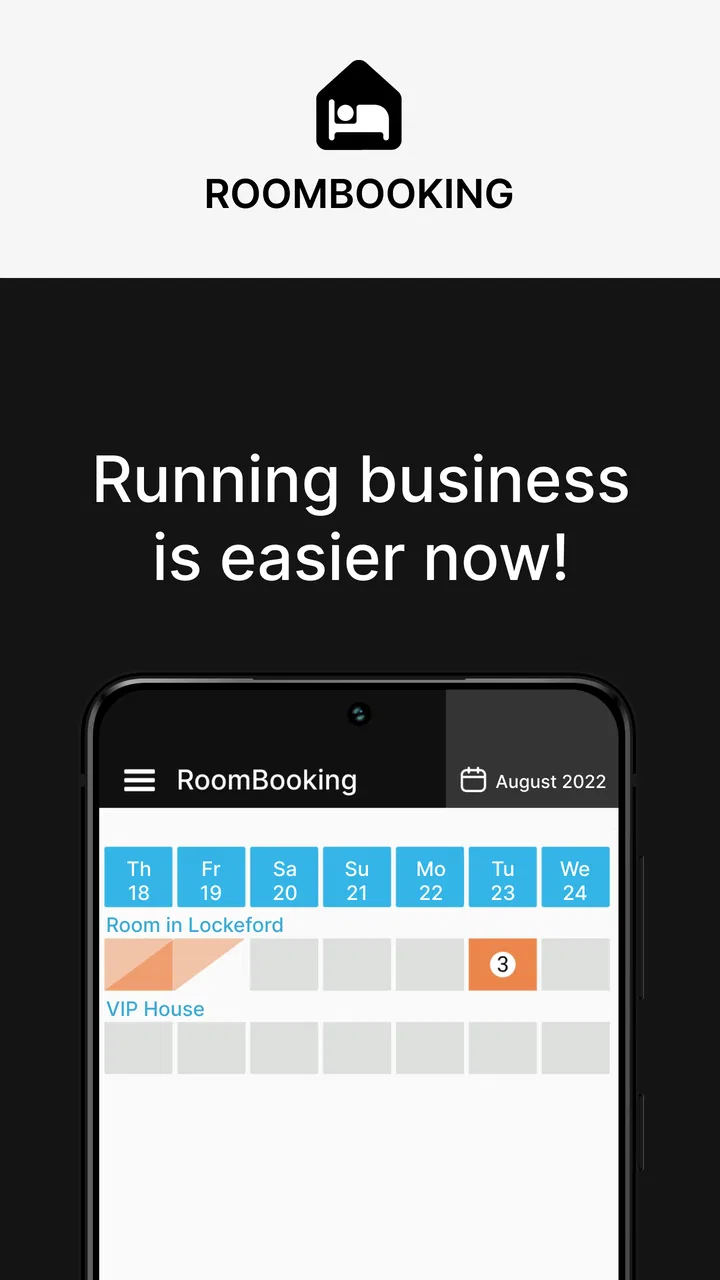
The central capability is the calendar for booking hotels, guest houses, and other rentable objects. In everyday use, that means turning scattered reservation details into a time-based view. Instead of checking messages, notebooks, and separate spreadsheets to work out whether a room can be offered, I can begin with the dates and inspect the relevant accommodation schedule.
That calendar-first design changes the question I ask. Rather than starting with a guest’s name and trying to remember what was promised, I start with a date range and look at the property’s occupancy. This is especially useful when somebody calls asking for a short stay, a late arrival, or a room that is available only between two existing reservations.
The important point is that the app is not simply a digital address book for guests. Its usefulness comes from arranging booking information around time and rental objects. For a property with several rooms, that visual arrangement can make gaps and overlaps easier to spot than a long text list.
I also like the fact that the idea is understandable without a long learning process. A person who has managed reservations on paper can usually grasp the purpose immediately: select the accommodation, place the booking in the relevant dates, and use the calendar as the working reference. That simplicity is a strength when the person responsible for bookings is also handling check-ins, cleaning, calls, and basic administration.
Why the calendar view is more useful than a message inbox
Many small rental businesses begin with conversations. A guest sends a message, the owner replies, and the reservation is mentally added to the schedule. That works until several guests ask about the same weekend or a booking changes at short notice. Messages show what people said, but they do not naturally show the complete occupancy picture.
A calendar gives me a different kind of information: the relationship between bookings. I can think in terms of empty spaces, occupied periods, and transitions. That is valuable when preparing rooms, assigning cleaning, or deciding whether a new request fits without disturbing another reservation.
There is also a practical psychological benefit. A written conversation can feel like a commitment even before the reservation has been placed into a proper schedule. A calendar encourages me to verify the dates before confirming anything. That small pause is one of the best habits a rental operator can develop.
How I would set up a useful working routine
I would begin by treating each room, apartment, guest house, or other rentable object as something that must be identifiable at a glance. The exact naming style matters more than it first appears. “Room 1” may be enough for a tiny property, while “Garden studio” or “Second-floor twin” is more useful when several spaces have different layouts.
After that, I would enter reservations as soon as they become firm rather than waiting until the end of the day. The calendar is only as reliable as the habit behind it. If a booking remains in a chat thread for several hours, another person answering the phone may not know that the dates are already taken.
For a shared operation, I would make the calendar the single place to check availability before promising a room. That does not require every employee to become a software specialist. It simply creates a consistent rule: conversations may begin a reservation, but the calendar is where the availability decision is verified.
A useful tip is to review the next changeover period separately from the rest of the month. A room can look available on a broad calendar while still requiring attention because one guest leaves and another arrives on the same day. Looking specifically at arrival and departure transitions helps reveal cleaning pressure, key handovers, and the risk of promising an early check-in too casually.
A realistic day with the app
Imagine that I manage a small guest house and receive a morning call from someone looking for two nights later in the week. I do not need to search through old messages first. I open the rental calendar, find the requested dates, and inspect the relevant accommodation. If a room is open, I can record the reservation while the details are still fresh.
Later, another guest asks whether a one-night extension is possible. This is where a calendar is more helpful than memory. I can look beyond the original departure date and see whether the room is already needed for the next arrival. If it is free, the extension may be straightforward. If not, I can offer another room or explain the limitation before making a promise.
In the afternoon, somebody on the cleaning side asks which spaces need attention tomorrow. The calendar becomes a planning reference rather than just a booking record. It helps connect reservations with physical work: preparing a room, checking a departure, and knowing which availability gaps are genuine rather than accidental.
This is not a dramatic automation story, and that is precisely why it feels realistic. The benefit comes from reducing small decisions and preventing avoidable misunderstandings. For a small property, those improvements can matter more than a long list of advanced functions that nobody has time to learn.
Three habits that make the calendar more dependable
Record changes immediately. A cancelled stay, altered departure, or room switch should be reflected while the conversation is happening. Delayed updates create the illusion that the calendar is wrong when the real problem is that it is outdated.
Check the object, not only the date. A free date is not enough if the request is for a particular room or property. Always match the guest’s needs with the correct rentable object before confirming.
Use the calendar before replying to availability questions. This turns the app into a decision checkpoint. It is more reliable than answering from memory, especially when several short stays create narrow gaps.
These habits are not flashy features, but they show where the app can have a real effect. A calendar does not prevent mistakes by itself. It becomes valuable when it is used as the authoritative schedule rather than as a place to copy information after the real decisions have already been made.
Where it fits beside familiar alternatives
The usual alternatives are a paper diary, a spreadsheet, a general calendar, or a full property-management system. A paper diary is quick and familiar, but it becomes difficult to share and easy to misread when bookings move around. A spreadsheet can hold more detail, yet it often depends on careful formatting and may feel less natural during a phone call.
A general calendar is flexible, but it is not necessarily organized around rooms and rental objects. It may show appointments well while making it harder to compare accommodation availability. RoomBooking: Rental Calendar is more focused than that kind of general tool because the booking schedule is the main point rather than one calendar among many.
A full property-management platform can be a better choice for a larger operation with multiple channels, staff permissions, payment records, guest communication, and reporting needs. The trade-off is complexity. A smaller host may pay with time, training, and administrative overhead for capabilities that are not needed every day.
That makes this app most interesting as a focused operational tool. It sits between informal record-keeping and heavyweight management software. I would not judge it by whether it replaces every system a hotel might use. I would judge it by whether it gives a small accommodation business a clearer answer to one recurring question: what is available, and when?
Friction and limitations to keep in mind
The same focus that makes the app approachable can also limit it. A calendar is excellent for occupancy planning, but it should not automatically be treated as a complete business system. If your work depends on detailed invoices, channel synchronization, automated guest messages, or deep financial reporting, you may need another tool alongside it or a different category of software altogether.
There is also a human limitation. If several people update bookings independently without agreeing on a routine, the calendar can become inconsistent. The app may be simple to understand, but a business still needs clear responsibility for entering changes and checking them. This is particularly important when reservations arrive through phone calls, walk-ins, and external booking services.
Another trade-off is detail versus speed. Adding enough information to distinguish rooms and stays is useful, but entering excessive notes can make the process slower during a busy call. I would keep the calendar focused on information needed to identify the reservation and protect availability, while storing longer guest conversations elsewhere if necessary.
The free price makes trying it low-risk, but in-app purchases range from $1.99 to $64.99 per item. That means I would examine any paid option carefully before building a workflow around it. The sensible approach is to begin with the basic calendar process, confirm that it suits the property, and only then decide whether an additional purchase solves a real operational problem.
Device compatibility is another practical checkpoint. Android 7.0 or later covers many devices, but anyone using an older phone or tablet should check compatibility before relying on the app for daily reservations. For a business, the device used at reception or by the owner is part of the workflow, so this small detail is worth handling early.
Who will gain the most from it
I see the strongest fit for independent hosts, small guest houses, and modest hotels that need a clear booking overview without starting with a complicated management suite. It can also suit someone who has outgrown a notebook but is not ready to redesign the entire business around enterprise-style software.
It is particularly useful when one person handles most reservations. That person benefits from having a consistent place to check before answering questions and from being able to see the effect of a booking on the rest of the schedule. The app may also help a small team establish a shared reference point, provided everyone follows the same update routine.
Owners managing several different rental objects may appreciate the calendar approach more than hosts with only one space. With one apartment and occasional bookings, a basic calendar or spreadsheet may be enough. As soon as there are multiple rooms, overlapping stays, or frequent date changes, the value of an object-based rental schedule becomes easier to notice.
I would recommend looking elsewhere if your priority is attracting guests through a marketplace, processing a broad range of payments, or coordinating a large operation with specialized departments. Those needs go beyond the central strength here. The app is a better match for organizing availability than for replacing every part of a hospitality business.
My recommendation after using the concept in practice
What I appreciate most about RoomBooking: Rental Calendar is its disciplined scope. It takes a recurring accommodation problem and gives it a calendar-shaped solution. That may sound modest, but the difference between a forgotten message and a visible booking can be the difference between a smooth arrival and a preventable conflict.
I would recommend it to a small rental operator who wants to move away from scattered notes and needs a practical schedule for rooms, guest houses, or other properties. I would start with clear names for each rentable object, enter reservations promptly, and make the calendar the first place checked before confirming availability.
I would not recommend treating it as a universal replacement for a full property-management platform. Its best role is narrower and more useful: keeping accommodation commitments understandable. For that job, a focused calendar can be easier to maintain than a large system, especially when the person using it values speed and clarity over a long list of business modules.
In the end, the app’s success depends on whether your daily difficulty is scheduling rather than sales or accounting. If a clean view of bookings would make your work calmer and reduce date mistakes, this free business app is worth testing. If your operation already requires extensive automation and multi-channel control, choose a more comprehensive solution and use a calendar tool only as one part of the wider process.
FAQs for RoomBooking: Rental Calendar
01What is RoomBooking: Rental Calendar used for?
RoomBooking: Rental Calendar is designed to help property owners, hosts, and small rental businesses organize reservations in one place. You can use it to track booked and available dates, review upcoming stays, and reduce the risk of double-booking. It is especially useful for rooms, apartments, vacation rentals, and other accommodation spaces managed without a complex property-management system.
02Does RoomBooking: Rental Calendar require an internet connection?
The app may allow you to view and manage calendar information on your device, but some functions can depend on an internet connection. Online access may be necessary for synchronization, backups, account-related features, or sharing reservation information. Before relying on it while traveling or in an area with poor reception, test which features remain available offline and confirm that your latest changes have been saved.
03Can I manage several rooms or rental properties with the app?
RoomBooking: Rental Calendar is intended for rental scheduling, but the exact number of rooms, units, or properties you can manage may depend on the app’s current version and any limitations of its free or paid plan. If you operate multiple accommodations, check how the app separates calendars and whether it supports individual availability, guest details, pricing, notes, or color coding for each rental.
04Does the app send booking reminders or prevent double bookings?
A rental calendar can make overlapping reservations easier to identify by displaying occupied and available dates clearly. However, users should not assume that every booking is automatically confirmed, blocked across external platforms, or protected from conflicts. Review the app’s notification, reminder, and synchronization options, and update reservations promptly when bookings are received through websites, phone calls, or other services.
05Is RoomBooking: Rental Calendar safe for storing guest and booking information?
Before entering personal guest details, review the app’s privacy policy, permissions, backup options, and data-handling practices. Avoid storing unnecessary sensitive information, such as payment card numbers or identity documents, unless the app clearly provides appropriate protection. Use a strong device passcode and keep the application updated. The app may be convenient for scheduling, but it should not automatically replace a dedicated secure payment or property-management platform.
Pros
- Simple calendar view makes reservations easy to track.
- Useful for managing multiple rooms or rental units.
- Quick booking updates help prevent scheduling conflicts.
- Designed for straightforward day-to-day rental management.
- Can reduce reliance on paper calendars and manual records.
Cons
- May feel too basic for large property management operations.
- Advanced reporting and analytics may be limited.
- Team collaboration features may not meet every business need.
- Initial setup can take time when adding many rooms.
- Availability of integrations may vary by device or subscription.

RoomBooking: Rental Calendar
Gallery